Sunday, November 2, 2014

Finding Serial Key Of Any Software Using Simple Google Trick


google tricks
Most of you download and use pirated software from torrents or any such other sites, but sometime it gets very difficult to find serial key of those softwares. I will make it easy foryou by showing you simple yet very intersting google trick which will allow you to findserial key of any software very easily.

How To Find Serial Key Of Any Software ?

The key 94FBR is a part of  Office 2000 Pro CD activation key that is widely distributed as it bypasses the activation requirements of Office 2000 Pro. By searching for 94fbr and the product name, you are guarantee that the pages that are returned are pages dealing specifically with the product you're wanting a serial for. Follow simple steps given below to learn this trick

    1. Go to Google
    2. Then type  Software Name 94FBR
  • Replace Software Name with the name of software whose serial key you want to find
  • Eg: To find serial key of Nero i will type Nero 94fbr
    3. Now press Enter and you will find serial key of software you are looking for as shown below.
google trick to find serial key

How To Remove All Your Google Web History?

Remove entire Google Web History
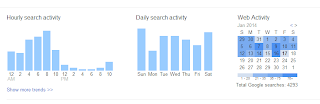
Remove entire Google Web History As most of you already know, Google keeps a tab on pretty much everything you do on a Google site, provided that you signed in on any one of these websites. Everything you do is recorded, and can be used against you in the future. Search data can reveal particularly sensitive information about you, such as facts about your location, interests, age, religious views, and so on. You can, however, choose to not be so vulnerable, and can remove all of your Google web history to protect yourself from an unforeseen eventuality.

In this post, I'll show you how to remove your entire Google web history.

Before we begin, please note that any data you remove will be deleted permanently. Google keeps a lot of useful information that helps you find what you're looking for faster. It gives you quick access to webpages you've visited in the past, and even lets you know in search results which pages you've visited, and when. This information can be useful if you're a power user, and like to get things done quickly.
Google Web History
Google Web History

But if you still want, you can go ahead and erase your entire web history. You can also pick and choose individual items to remove, so that you won't lose everything.
Delete your Google Web History
Follow these steps to partially or completely.

Step 1: Visit your Google History page at https://www.google.com/history. Alternatively, you can click the gear icon  on the upper right corner of a search results page, and then go to Search history.
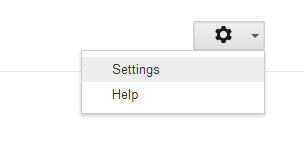
Step 2: Click on the gear  icon again, and then go to Settings.
Settings
Settings
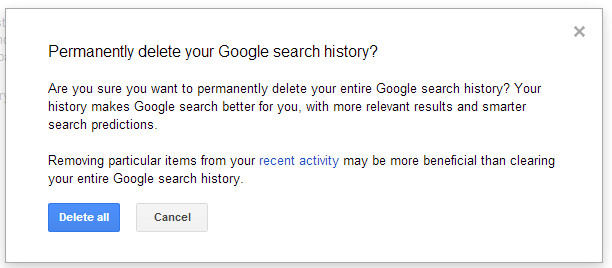
Step 3: Click on the delete all link. You'll be prompted for a confirmation. Click on Delete all again, and your entire search history is gone!

Step 4 (optional): Click on the Turn off button on the Settings page to stop Google from storing your history again

If you don't want to delete your entire history, you can select individual items from the History main page, and delete them. This, by no means, implies that Google has nothing more to do with your data. They still keep some of your information on their servers for auditing and other such purposes. But at least your personal data is off the line now, and isn't susceptible to leaking out into the wrong hands.

View Or Hack Unprotected Live Cameras Using Google


hack unprotected cam
In this tutorial i will teach you to hack or view unprotected cam using a simple google trick. Using this trick you can see live view of streets in china or america. Inner view of some office and lot more. Lets dive into it.

How To View Unprotected Cam ?       

     1. Go to Google and search for "inurl:view/view.shtml" (without quote).
           2. Now open any of the link from the search result and enjoy.
             3. Below is the list of google dork you can use to see more cams.

      Saturday, November 1, 2014

      How To Place Adsense Ads Just Below Post Title ?

      Adsense Ads Below Post Title
      The chances of ads being clicked by users below post title is highest. Placing an Adsense ads just below post title will increase CTR (Click Through Rate) and let you earn more money. Even here on MBWthe most ads clicked are below the post title. Placing ads below post title is not that difficult. Today in this tutorial i will teach you to place google Adsense ads jus below the post title. So lets get into it and increase your Adsense earnings.

      Generating Adsense Code

      1. Before starting with the tutorial you might like to read:
      2. Logging to your Google Adsense account and create new ad unit.
      3. I would recommend using 300x250 Medium rectangle for the best result (that what we use on our blog).
      4. Next get the Adsense code
      5. We need to escape the code before placing them into our template else it won't be displayed on our blog. In order to do that run your code through our HTML Encoder.

      Placing Adsense Ads Below Post Title

      1. Go to Blogger > Template > Edit Html
      2. Search for <data:post.body/> by pressing Ctrl + F
      3. Paste the code given below just above <data:post.body/>
      <b:if cond='data:blog.pageType == &quot;item&quot;'>
              Your Encoded Adsense Code
      </b:if>
      4. In above step we placed our ad code between if condition, so that ads do not appear on home page. If you want ads to appear on main page also then just remove the conditions.

      How And Why To Socialize With Your Blog Readers In An Effective Manner

      blogging trick socialize with readers
      Are you not getting enough traffic on your blog in spite of of writing good quality articles with relevant and useful information for your readers? What if I told you, your readers really don't want to read your blog. You provide sufficient information but in the manner that bores your readers. Properly socializing with your readers is one important objective of a blog post. Boring them with just stats and figures will do no good to you but telling them the same information in a friendly manner will increase their participation and response. Today, we'll take a look at a few techniques in writing, that you can use to effectively socialize with your blog readers, and their importance.
      What bloggers should realize is that Search Engine Optimization isn't their primary goal, they also have a human audience that needs to be addressed properly. Ignoring this factor often makes bloggers write highly optimized blog posts but for the search engine and not for the user. The user finds it irritating and boring. Keeping them entertained is one key principle of blogging. Let's take a look at a few techniques you can use here.

      1. Use a friendly tone while writing

      One of the easiest ways to socialize effectively with your blog audience is to use a friendly tone in writing. Instead of just giving the news like stubborn reporter, try to be frank with them and make them feel relaxed and entertained while reading your post. Frankness though has some limits you shouldn't cross. You should try to satisfy both, theSEO robot and your human reader for maximum benefit.

      2. Ask questions

      You should ask questions within text thereby navigating your readers to the comments section. This would help them participate in the conversations which would maintain a good reputation of yours in their perspective and you can get subscribers in no time. That would greatly increase your interaction with the users and will keep you engaged and connected. 

      3. Participate actively in the comments section

      Instead of just dragging your readers to the comment section and argue within themselves, try your best to be the part of every thread in the comment section. The readers will not only value your opinion there but will also be pushed to participate here themselves. This would help both the parties get a better understanding of each other and it will really help you write your next post, since you'd know your audience. Don't keep replies pending for long. Use our recent comment widget to get updated about latest comment on your blog.

      4. Write on what your readers like to read

      You can effectively use the comments section to determine the taste and opinions of your users and the decision about what to write on narrows down. You can write on their submitted problems or major queries which will keep them actively participating on the blog because of being given importance to. Moreover, your readers are your target audience, try to analyse their basic taste and views on the subject and shape your planning accordingly.

      5. Be open about yourself

      Instead of just providing information about the subject, try to introduce yourself and give examples where required in the blog posts. Once people get to know you, they would feel close to you and your interaction will greatly improve. Such technique reduces the hesitations and differences people mostly have in their minds about others.

      Why is this important?

      Your readers are your key to getting everything. Whether its traffic, sharing or subscriptions, its your readers that will come to help. Behaving like a good human being with these readers will create a long lasting impression in their minds about you and they would consider you as an advisor and a friend which will increase your interactions and hence, the responses and yes, traffic! A characteristic of a good and successful blog is its large actively participating user base. Without being at good and friendly terms with the users, you can never really touch that mark.

      The post surely covered some major techniques to make good relations with your readers. What's your say on the title? Do you agree with our points here? Let us know in the comments section.

      Few Tips To get Success Through Guest Blogging

      Few Tips To get Success Through Guest Blogging
      This article explains how a blogger may accept guest posts, and gives a few common mistakes that the blogger should avoid. It has advice such as reminding the blogger to check where the guest post links to, and to remember to read the guest post before accepting and uploading it. As a blog master you are able to accept guest post from other people. Here are common mistakes that blog masters make, which often lead to further problems in the future, along with a few tips on doing it right.

      Mistake - Allowing yourself to be nagged or bullied by potential posters

      Some people are going to nag you via email, or even send threatening emails in order to make you post their guest post a little faster, or agree to post it in the first place. Sadly, this technique works upon occasion, but you must not allow yourself to be bullied or nagged or you will perpetuate the use of bullying and nagging.

      Do - Insist the guest poster show you his plans for promoting the guest post

      They all have their own social media network profiles and accounts and yet so few blog masters ask the guest poster to promote the post after it is uploaded. Ask them for their plans on how they intend to promote the post and they will often agree that they are going to mention it on their social media networks and such.

      Mistake - Not checking the site that the guest post links to

      Some people will try to link their guest blog post to a website that has nothing to do with your blog, or the post that they want to upload. They may even wish to link to an adult site, piracy site or a website containing malware. Check each link before posting the guest blog post in order to avoid potential future problems.

      Do - Make demands of your guest poster

      You can insist that within their post they mention you, your blog, your company or your products. What you ask for is up to you, just do not turn down this golden opportunity to have another person say great things about you on a guest post that is headed for your website.

      Mistake - Not proofreading the article for mistakes

      Do not assume that the guest blogger has checked the post before sending it to you. They may have sent a piece that is poorly written in order to get rid of it, or may have simply not bothered to check the piece due to laziness. If the piece has multiple mistakes then reject it or send it back with notes for improvement.

      Do - Consider taking payment for guest posts

      If you have a popular blog then there is nothing stopping you from asking people for a payment for insertion of their guest post. If they contacted you first then where is the harm in it. Just so long as you do not write about what you are doing anywhere Google may find out then you are laughing.

      Mistake - Not reading the article before uploading it

      Some bloggers do not even bother to read the guest post before uploading it. There are some bloggers who will, at most, speed read the text. But, you need to make sure that the post is relevant to your blog, and that it is not going to offend your loyal readers.

      Do - Be very selective about who you allow to guest post

      Imagine that your blog is like your own TV show. You do not want scruff bags on your show, so do not accept low quality content or guests on your blog. Guard the good name of your blog, even if this means doing a bit of research on the person who is making the guest post on your blog. Do not forget that you have a powerful weapon called “no”.

      Mistake - Not creating any submission guidelines

      If you allow guest posts but do not create any submission guidelines, then you are going to receive a mixed bag of content, writing quality and formats. If you create submission guidelines then you will avoid a lot of future problems and speed up the guest blogging process. You can create submission guidelines on the format and file type that people send guest post articles. You can describe the type of content that is inappropriate for your blog, and describe the types of websites that you are not willing to link to.

      What Should Be The Length Of An Ideal Blog Post ?


      What Should Be The Length Of An Ideal Blog Post
      While writing a blog post the one important thing that comes to most bloggers mind is that how long should there blog post be. According to me Your blog post should be long enough to serve the main purpose of your post. If you feel that you shared what you intended to share with your audience you should stop. There is no such rule on the length of a blog post. You can share same idea in 300 words or 1000 words thats all matter of practice. Lets talk in more details about how long an ideal post should be.

      So How Long Should Be Your Post ?

      First thing to keep in mind for new bloggers is that not to fear long or short blog post since their is no rule of word count. Try to send your message in short and straight forward way. Do not write unwanted stuff in your post just to make it long. When you feel comfortable that you written what you have intended to share with your audience..Give it a Stop!
      There is no word limit but try to write blog post of 500-600 words and if you blog is about technology or something that requires several post a day then your article should be short and straight forward of around 300 words each. Some time long posts are boring so its better to give your audience the main idea of your post in as simple way as possible. Also make sure that you don't write very short post as they might get ignored by your readers.

      How To Organize You Blog Post ?

      What Should Be The Length Of An Ideal Blog Post
      When writing your post make sure to organize it properly. Add relevant and eye catching graphics in your post and also separate different section of the article with suitable sub headings. Don't write your post in one single paragraph as no one likes to read such post. The more organized your article is the more readers you will attract. As you can see on our blog we always add main image for our blog post along with few other relevant images inside out post. More ever we separate our content with proper headings. Check out below tutorial to Style Subheading On your blog.

      Blog Archive

      Statistik


      widget

      Popular Posts