Tuesday, November 4, 2014

Finding Ip Address Of A Website Using Command Prompt Or CMD

In this tutorial i will teach you to find Ip Address of any website using Command Prompt or in short CMD. Using IP Address you can find location of the website server and do more stuff. I will demostrate this tutorial with Google but you can use this method to find IP Address of any website like twitter, facebook etc. So lets get started.

How to find IP ?

1. Go to Start > Type CMD and press Enter.
2. Now write Ping followed by website URL whose IP you want to find.
finding ip adddress of website

3. It will take less then a second and come up with the results as shown below.
finding ip adddress of website

In  my next post i will show you another easy way to find website IP Address and teach you to use this IP to find its location.

Change Your Ip In Less Then 1 Minute


                     In my previous post i had show you how to Grab someone ip address now i will show you how to change ip address in less then a minute. For now it will take 2 to 3 minutes but with some practice you can do this within a minute.


  • Click on "Start" in the bottom left corner of the screen.
  • Click on "RUN"
  • Type in "command" and click OK

      You should be now at MSDOS prompt Screen

  • Type "ipconfig /release" just like that, and press "enter"
  • Type "exit" and leave the prompt
  • Right-click on "Network Places" or "My Network Places" on your desktop.
  • Click on "properties"

     Now you should  be on a screen with something titled "Local Area Connection", or something  similar to that, and, if you have a network hooked up, all of your other networks.

  •  Right click on "Local Area Connection" and click "properties"
  • Double-click on the "Internet Protocol (TCP/IP)" from the list under the "General" tab
  • Click on "Use the following IP address" under the "General" tab
  • Create an IP address (It doesn't matter what it is)
  • Press "Tab" and it should automatically fill in the "Subnet Mask" section with default numbers.
  • Press the "Ok" button here
  • Hit the "Ok" button again

     Now you should be back to the "Local Area Connection" screen.

  • Right-click back on "Local Area Connection" and go to properties again.
  • Go back to the "TCP/IP" settings
  • This time, select "Obtain an IP address automatically"
  • Click on "Ok"
  • Hit "Ok" again.
  • Now you have a New IP address.

Block Facebook On Your Computer In Few Simple Steps


facebook blocker
I had previously posted about Blocking Facebook on your computer but many users were facing difficulties doing that. So In this tutorial i will share with you guys an amazing programme or small little tool that will allow you block facebook on your computer easily in just few simple steps. So lets get started

How To Use Facebook Blocker ? 

 1. First download Facebook Blocker by Clicking Here
  2. Extract the file and right click on Facebook Blocker.exe and run it as administator(Important)
  3. Press 1 in order to  backup your host file to be on the safe side.
facebook blocker
  4. Now Press 2 to block facebook
  5. Its time to check if facebook is blocked or not to do that Press 5
  6. Hope this help you if you have any question leave a comment below.

Best Content Promotion Strategies To Win The Google

Google content marketing
Here you will find a few content promotion strategies and methods so that you can win the Google race. They are all fairly standard methods since there are no real secrets in this area. If there were then only a select group would get to Google instead of any old dogs body. Some of this content promotion strategy includes Guest posting, Managing your own blog, choosing target audience or submitting articles to article sites.

Google content marketing
The idea is to get the right attention from the right people, whilst also battling your competition. The idea of competition is a big deal because it varies so much. It is possible to go for keywords and market segments that are rarely used by others. This will mean you have very let competition. You could go for a very popular keyword or market segment. This will make getting your website ranked highly harder. There is only so much SEO (Search Engine Optimization) that you can do, which is why competing for very highly popular keywords or market segments is so difficult.

Choosing which race you want to be a part of

This has nothing to do with Google or any other search engine. This has to do with the consumer you are trying to target. How well you target that consumer will determine which race you become part of. Each page of your website may become a contender in a different race, although the overall SEO may be damaged if your races vary too differently. For example, if one page tries to attract new mothers where another tries to attack old-male bikers then the overall SEO of the website may be damaged. 

Choose the race by choosing the reader. You need to know what that reader is going got put into your website before he or she does. You need to be able to figure out how his or her mind works.

Posting articles on article websites

article submission
This is an easy strategy for promoting your website, your content, your business/website name and for getting your word out there consistently. There is little stopping you from writing an article per week on an article site and doing it for as long as you like.

The great thing about article websites is how reliable they are. They are not like blogs that may stop one day for no reason. They are also unlikely to put your content online only to remove it a few days later. Article sites also have very far fewer rules and less of a time delay between posting an article and having it appear online.

Creating and maintaining you own blog

If you want a place to promote your content that is very reliable, then you should own it. Any of the potential problems of article sites or guest blogging become obsolete when you create your own blog. You can post as often as you like and you can be sure that the content will remain so long as your blog does.

Video, audio and text based content on social media networks

social media
Social Media networks are there for you to post content on. You may also set up as many accounts as you wish, which means you are going to have plenty of places to post your content. There are also a lot of social media networks out there so you can create lots of varieties of social media posts too.  There are also social bookmarking websites you can try too.

Guest posting on the blogs of others

guest posting
If you want a place to promote your content then the blogs of others is not a terrible idea. It is very popular in the eyes of Google at the moment as an SEOmethod. It means putting your content on another person’s blog, which is SEO friendly assuming that the blog master is paying attention to his or her or own SEO without resorting to any type of black-hat SEO.

Adding your content to the website of others

It is frankly easier to get people to accept your links on their website than it is to get them to add your content. And, backlinks to your website are very search engine friendly, but if you want them to add your content then consider a deal where they create a brand new URL and give it to you to fill up. So long as the URL is mixed in with their page navigation so that Google can find it then you are set. How you convince the web master to do this sort of thing is up to you, but you could always pay him or her.

Automatically Tweet Your Blog Post On Twitter


Twitter Feed
Twitter is a huge social media platform to share your blog post to increase traffic to your blog. You can generate large amount of traffic from twitter. More frequently you tweet about your blog more is the visitors you will generate. But it is annoying to tweet everytime you post a new article on your blog. In this post i will teach you a simple way to auto tweet your new blog post on twitter easily using Twitter Feed.


   1. Go to TwitterFeed.
   2. Create a New account by clicking on Register Now.
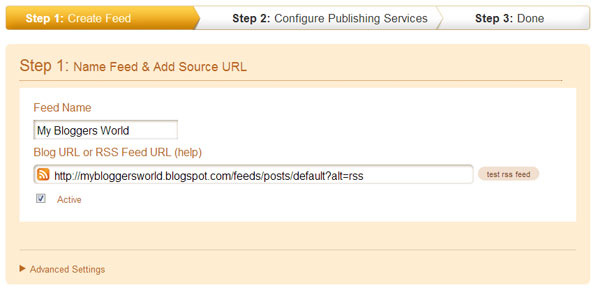
   3. Then enter your blog name in Feed Name and your blog url in url field as shown in below image.
Twitter Feed
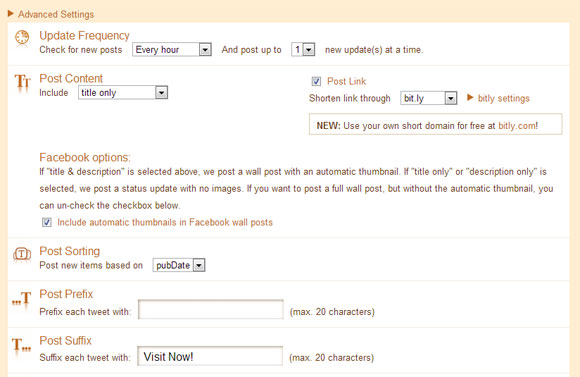
   4. Then click on Advance setting and change setting as shown below.

twitterf eed

    5. Then click on continue to next step.
    6. Choose Twitter from Available Services (You can also Choose Facebook and LinkedIn if  you like).
  7.Authenticate your twitter account by clicking on Twitter and entering your twitter username and password.
  8. Then click on Create Service. Now whenever you publish new post on your blog it will be automatically tweeted on your twitter account.

Add Facebook Alike Twitter Fan Box To Your Blog

facebook alike twitter fan box
I had already posted on adding Twitter Follow Button to your blog, but Today in this post i am going to show you to add Twitter fan box to your blog which looks similar to Facebook Like Box. This is an third pary widget or application devloped by Mark Carey. This widget can help you to achieve more twitter followers and eventually results in greater traffic from twitter. This twitter fan box shows images or avatar of top 10 newest followers on you twitter account. This widget will let your blog visitors to easily follow you on twitter from within your blog. So lets add this great widget to your blog or website.

How to add ?

1. Go to blogger Dashboard and select Layout.
2. Then click on Add Gadget and select Html/Javascript
3. Now paste the code given below in it.

<script type="text/javascript"
src="http://s.moopz.com/fanbox_init.js"></script><div
id="twitterfanbox"><!--mybloggersworld.com--></div><script
type="text/javascript">fanbox_init("mybloggersworld");</script> 
4. Make sure to replace mybloggersworld with your twitter username.
5. Save the widget and you are done. 

Top 7 Game Controller Apps For iPhone Promising Great Gaming Action


Game enthusiast loves the myriad of game apps available by a few iPhone App Development Company. Every game lover will certainly love to play till the time their phone battery doesn't die. However, most of the gamers feel frustrated when their hands or fingers cramping keep spoiling their game view. Well, that's a common problem that game players usually encounter with virtual controls on touchscreen handsets.
Fortunately, now you can have access to some great gadgets that will help turn your iPhone devices into game controllers.


1. GameDock

gamedock iphone game controller
If you miss gaming with your friend, then GameDock is the perfect gadget that puts you into a classic console. This will definitely remind you of the time when you used to game with a friend. GameDock is a multiplayer gaming platform that turns your iPhone into a 2 player game console. The best part is that it allows you to enjoy high-definition gaming action with your friends worldwide in real time. However, it's available for a cost amounting to $89.

2. JOYSTICK-IT Arcade Stick

Joystick game controller
If you don't like playing a game without your joystick, then you can bank upon JOYSTICK-IT Arcade Stick which has been introduced by reputed iPhone Development Company. This ThinkGeek gadget allows you to add a real physical joystick to your iPhone device. With just a simple push you'll be able to stick the game controller to your iPhone's screen (you no longer need any wires or batteries). It's easy to remove or can also be re-adjusted without harming your screen. JOYSTICK-IT is lightweight and enables accurate movement and enhanced playability.

3. Razor JungleCat

Razor Junglecat game controller
If you urge to elevate your gaming experience by jumping faster, driving with better precision, and so on, then you should better opt for the Razer Junglecat mobile game controller for your iPhone. It features ABXY action buttons, a D-pad and most importantly the bumpers on this gamepad on this sliding case will let you enjoy some hard-hitting game action on-the-go. The gamepad easily slides under the phone, and turn your phone into a pocket-size device. However, the solid encasing of Razor JungleCat acts as your iPhone device's protective covering.

4. Impulse

impulse iphone controller
iMpulse is a tiny iPhone game controller, with the size as that of a keychain. In fact, it's actually a keychain. Impulse provides game players the wherewithal to bind and find their keys! Put simply, as gamers you'll have to chain your keys to the Impulse controller and then locate the keys. But, in case you can’t find them, just press the ‘Locate’ button in your iPhone app and retrieve the keys. It's available for $40.

5. Joypad

joypad game controller
Joypad turns your iPhone into a functional game controller. This game console acts as a dashboard that allows you to play all types of Joypad enabled games using your iPhone as the game controller. However, apart from installing this app you should also install "Joypad Game Controller" on your iPhone. Both the applications will sync up, and you'll see a controller on your phone screen, using which you'll be able to navigate the dashboard.


6. ICADE

icade game controller
If you're serious about mobile gaming then you should opt for ICADE. This excellent handheld game controller for iPhone comes with a classic controller configuration, making it easy for players to play modern and retro games as well in a more precise manner. It boasts a four-way directional pad, action buttons, and 4 shoulder buttons. It can even get connected to Bluetooth.

7. Moga Ace Power

moga ace power game controller
This is one of the first iOS 7 game controller that was launched in the market last year. Moga Ace Power helps to add a comprehensive set of D-pad, buttons, triggers and more to a split-apart case that slides over an iPhone 5/5S. Though, the plastic construction of the controller sometimes feels low in quality, but its built-in battery pack and a handy button layout makes Ace Power a strong choice for iPhone gamers. It's available for $99.99.

Final Thought

If you often get furious pressing hard on the button to play your game, then it's time you should switch to iPhone game controllers. With the game controlling gadgets for iPhone you can enjoy complete gaming action. Now you don't have to worry about cramps or your fingers getting numb! With the aforementioned list of top 7 game controllers just continue to game until your phone's battery run out.

Blog Archive

Statistik


widget

Popular Posts